Discrete colour fill scales for Analysis Function plots
Source:R/scale_fill_discrete_af.R
scale_fill_discrete_af.RdDiscrete colour fill scales for Analysis Function plots
Usage
scale_fill_discrete_af(
  palette = "categorical",
  palette_type = c("af"),
  reverse = FALSE,
  na.value = afcharts::af_pale_grey,
  ...
)
Arguments
- palette
Name of palette to use from
af_colour_palettes; e.g."categorical","sequential","focus". Default value is"categorical".- palette_type
Currently only the Analysis Function palettes are supported. Defaults to "af".
- reverse
Boolean value to indicate whether the palette should be reversed.
- na.value
Colour to set for missing values.
- ...
Additional arguments passed to scale type.
Details
If the palette is set to "categorical" or "sequential" and fewer than the maximum number of colours are required then the colours will be used in the correct order following the analysis function guidance.
E.g. If only two colours are required and the palette is set to
"categorical" then the "categorical2" palette will be used instead,
without warning.
Examples
library(ggplot2)
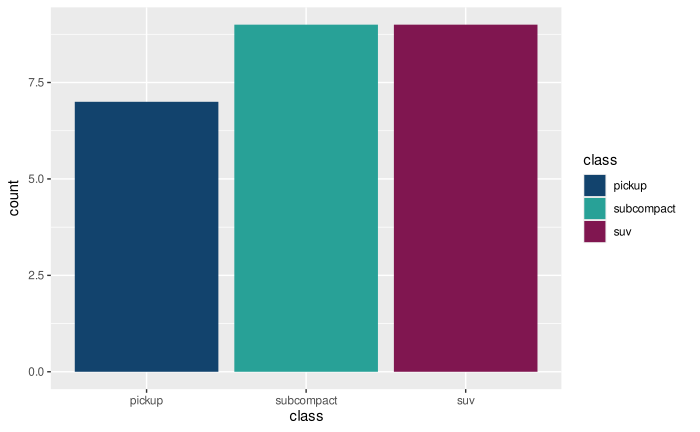
d <- subset(mpg, manufacturer == "ford")
ggplot(d, aes(x = class, fill = class)) +
geom_bar() +
scale_fill_discrete_af()
 # The Analysis Function guidance recommends using a dark blue outline on
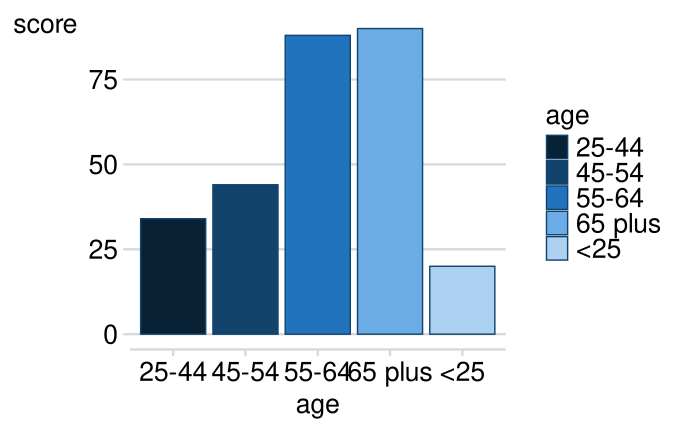
# barcharts with a sequential colour palette
d2 <- data.frame(
age = c("<25", "25-44", "45-54", "55-64", "65 plus"),
score = c(20, 34, 44, 88, 90)
)
ggplot(d2, aes(x = age, y = score, fill = age)) +
geom_col(colour = af_dark_blue) +
scale_fill_discrete_af(palette = "sequential")
# The Analysis Function guidance recommends using a dark blue outline on
# barcharts with a sequential colour palette
d2 <- data.frame(
age = c("<25", "25-44", "45-54", "55-64", "65 plus"),
score = c(20, 34, 44, 88, 90)
)
ggplot(d2, aes(x = age, y = score, fill = age)) +
geom_col(colour = af_dark_blue) +
scale_fill_discrete_af(palette = "sequential")